

Appearance
Api3 Administrators group
This group is available only to admins. When the AI checks made by the Api3 Guardian bot detect a message violation the following process is triggered.
- The user's message is stored temporarily (7.1 days) in the root level folder named
telegram-messages - The user's message is deleted from Telegram
- The user is placed in a 24 hour timeout (known as restricted in Telegram speak)
- The bot sends an "Admin actions" message to the Api3 Administrators group
Admin actions
When a user message has been determined to violate the chat rules an Admin action message appears on the Api3 Administrators group for the user message. Admins use this message to determine what action to take for the user message.
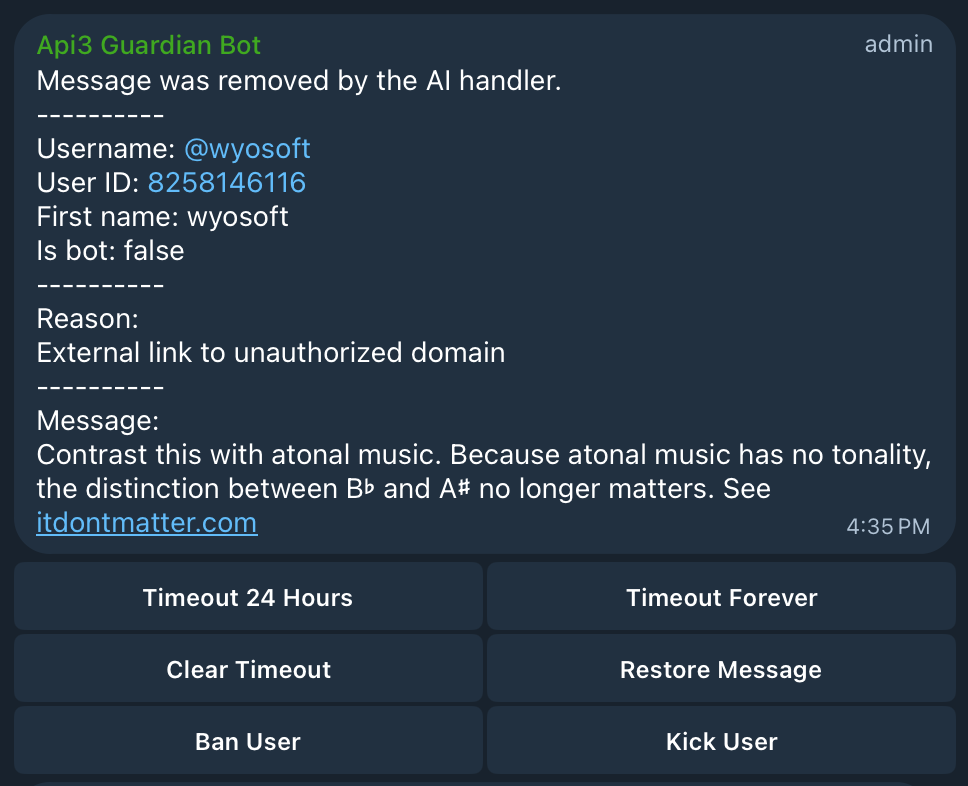
When the above message appears the user has already been placed into a 24 hour timeout. An admin must decide what action to take.
Note that an admin can select any button more than once. This can cause unnecessary chat so try to think about choices first. The selections Restore Message, Ban User, and Kick User canot be reversed by this UI.
Timeout 24 Hours
By default the user is already in a 24 hour timeout. If you clear or extend the timeout forever, you can still set them back to a 24 hour timeout. You can change the timeout state even after selecting forever.
Timeout forever
This sets the user to a forever timeout. This is not banning them but rather allows them to still be an active member that cannot send message. Effectively a read only user.
Clear Timeout
This will remove any timeout assigned to the user. Meaning they can send messages again (if you did not Ban or Kick the user first). Usually this selection is used after having a conversation with the user about the violation in a DM. A rare occurrence but sometimes users do not read or misunderstood the rules. You can change the timeout state even after selecting clear timeout.
Restore Message
To the Admin it may be obvious the AI check was mistaken. This selection will clear the timeout (if you did not Ban or Kick the user first) and re-post the message. This must be done within the next 7.1 days. The re-posted message will be done by the bot because it is not possible to post on a user's behave.
Ban User
The user will be moved from the "Members: list to the "Removed Users" list. The removed user list is only available on the Telegram mobile. This action cannot be reversed. Users in the removed list cannot rejoin the group. To undo a ban so that a user can rejoin the group you must delete them from the removed list. This is effectively kicking them from the group. Once in the removed list you cannot return them to the members list.
Kick User
When you kick a user you are forcing them to leave the group. This is different than a ban in-that the user can rejoin the group anytime.